Hyprland and seven small tools.
waybar for the bar, fuzzel to launch, swaync for notifications, hyprlock and hypridle, swaybg for the wallpaper, foot as the terminal. No blur, no shadows, short animations, the w3bs palette.
 w3bs.AccountStart building
 W3BS DE is a minimal Wayland desktop for people who work with agents. Hyprland underneath, one bar, one launcher, one notification center, and the Agentic Desktop Layer built in: your agents can see and use this desktop when, and only when, you turn agent access on.
curl -fsSL https://w3bs.org/de/install.sh | shIt installs Hyprland and a handful of small tools with your package manager (it asks first), the W3BS DE defaults in your home directory, a "W3BS DE" entry on your login screen, and the Agentic Desktop Layer. Read it first: de/install.sh.
--verify-config. W3BS DE is an independent project built on Hyprland; it is not made by or affiliated with the Hyprland project.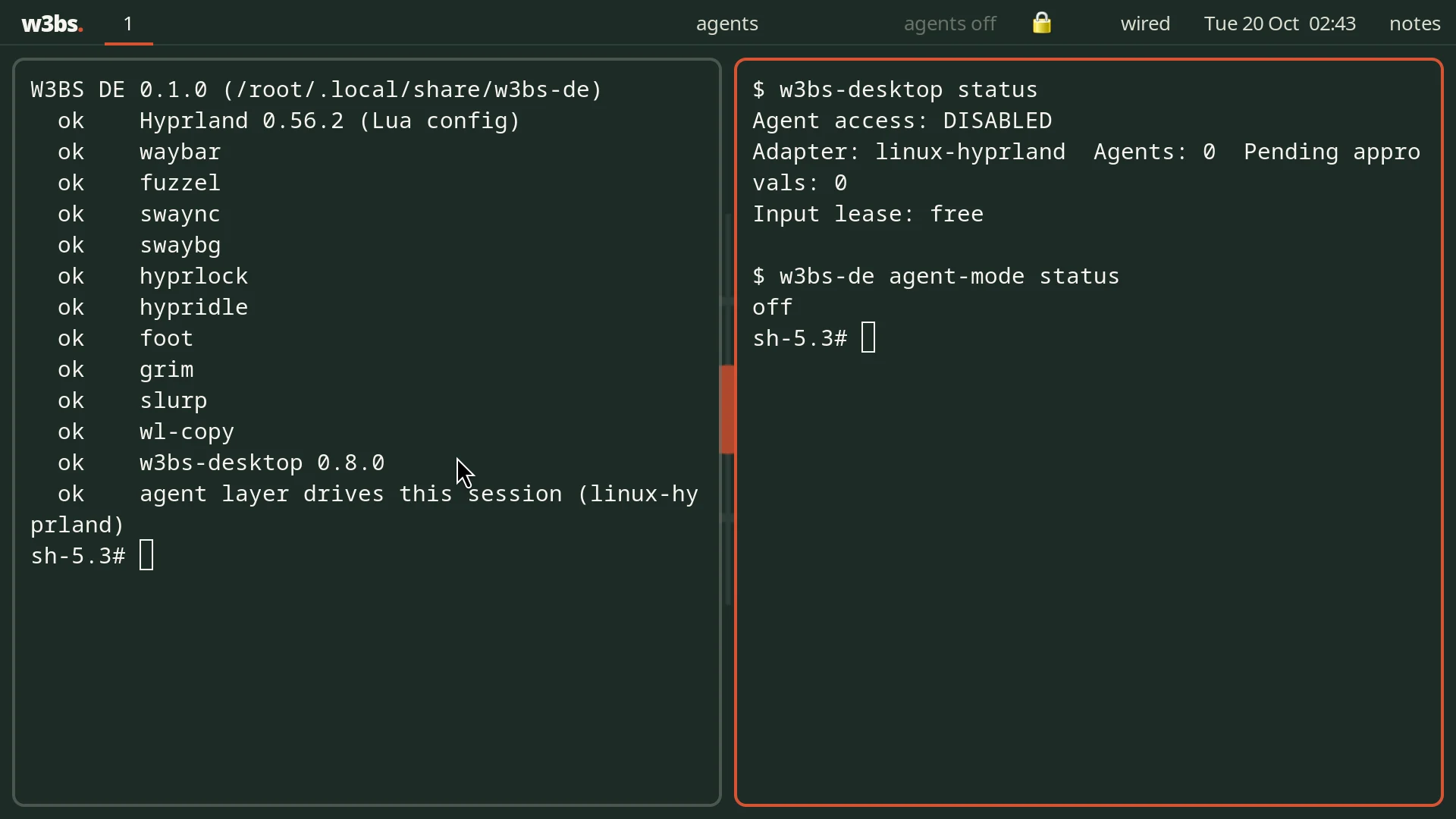
Every piece is something you could name and replace. Nothing runs that you did not ask for.
waybar for the bar, fuzzel to launch, swaync for notifications, hyprlock and hypridle, swaybg for the wallpaper, foot as the terminal. No blur, no shadows, short animations, the w3bs palette.
Predictable tiling, windows that open where they say, real window titles, and a desktop layer that types any Unicode character exactly. Agents see what you see.
The defaults live in ~/.local/share/w3bs-de; your changes go in ~/.config/w3bs-de/hypr/user.lua and load last. W3BS DE uses its own config, so an existing Hyprland setup is left alone.
The Agentic Desktop Layer starts with the session, Disabled. Everything it does on any desktop, it does here, with a backend made for Hyprland.
The agent indicator reads off, on, which agent is driving, or "agent needs you". Click it for the control app; right-click turns agent access off. SUPER + ALT + ESCAPE does the same from anywhere.
An agent asks before it drives, and hands you anything only a person should do: CAPTCHAs, sign-in codes, passwords, payments. They pop up in the notification center with their buttons.
SUPER + SHIFT + A shows a scratch workspace where agents can work while you use the others. Agent mode (w3bs-de agent-mode on) keeps the screen unlocked while agents work unattended; leave it off otherwise.
SUPER is the Windows or Command key. Add your own in user.lua with w3bs.bind("SUPER + E", "Files", "nautilus").
| Keys | Does |
|---|---|
SUPER + SPACE | Launcher |
SUPER + RETURN | Terminal |
SUPER + W | Close the window |
SUPER + 1 … 9 | Workspaces (add SHIFT to move the window) |
SUPER + arrows | Focus (add SHIFT to swap) |
SUPER + T / F | Float or tile / full screen |
SUPER + A | Agent control panel |
SUPER + SHIFT + A | The agent workspace (a scratch space agents can use out of your way) |
SUPER + ALT + ESCAPE | Turn agent access off, from anywhere |
SUPER + N | Notifications |
SUPER + ESCAPE | Lock |
PRINT | Screenshot a region to the clipboard |
W3BS DE installs Hyprland from your distribution; it does not build or bundle it. Hyprland 0.55 and later use the Lua defaults; older releases get the same desktop from hyprlang defaults.
| Distribution | Hyprland from | Version |
|---|---|---|
| Arch, EndeavourOS, CachyOS | pacman (extra) | Hyprland 0.56 |
| Fedora | COPR lionheartp/Hyprland (the one the Hyprland wiki lists) | Hyprland 0.56 |
| Debian | trixie-backports, forky, sid | 0.55 and later |
| Ubuntu | 26.10 and later (26.04 ships 0.53: hyprlang defaults) | 0.56 |
| Alpine, postmarketOS | community (edge) | 0.54: hyprlang defaults |
| openSUSE Tumbleweed | zypper | current |
| NixOS | the installer prints the configuration.nix lines | current |
The w3bs-de command runs the session and its helpers.
w3bs-de session            start the desktop (what the login screen runs)
w3bs-de doctor             check what the desktop and its agent layer need
w3bs-de agent-mode on|off  keep the screen unlocked while agents work unattended
w3bs-de wallpaper [FILE]   set (or reset) the wallpaper
w3bs-de screenshot region|screen
w3bs-de update             fetch the latest defaults (your settings are kept)

Install options: --yes, --no-packages, --no-agents, --no-session
rm -rf ~/.local/share/w3bs-de ~/.local/bin/w3bs-de
rm -rf ~/.config/w3bs-de                      # your settings
sudo rm -f /usr/share/wayland-sessions/w3bs-de.desktop /usr/local/bin/w3bs-de
# Hyprland and the tools stay installed; remove them with your package manager.